Briefing Information:





- In this tutorial I will show you how to detect malware and trace it via packet sniffing.
Things you need:
- VMWare - This is highly recommended. If you dont have it, use torrents or google to find a good installation with a working key. I am also providing this.

Key : 5F2X0-8H3EQ-0ZYD0-928QP-9232Z
- WireShark - http://www.wireshark.org/download.html
- Sandboxie - http://www.sandboxie.com/
- Download and Install VMWare, install the operating system of your choice.
- Download WireShark. Make sure you install WinPcap with it if you dont already have it installed.
- Download Sandboxie. install it, no need for the full version at the moment.
PART 2 - Detecting malware:
**I RECOMMEND THAT YOU DO THIS IN VMWARE. This is more important for part 3 but still recommended**
For this tutorial, I recommend you use your own malware until you know what your doing. I will be using an IRC bot for this example.
Basically what we are doing first is using Sandboxie to detect if a file has a backdoor in it. I will show you two examples first, Example 1 is putty by itself (clean). Example 2 will be putty with a binded file (backdoor).
1) Right click on the program you want to run, and select "Run Sandboxed" (the free version will make u wait like 5 sec then just hit continue or whatever if it asks)
Basically what we are doing first is using Sandboxie to detect if a file has a backdoor in it. I will show you two examples first, Example 1 is putty by itself (clean). Example 2 will be putty with a binded file (backdoor).
1) Right click on the program you want to run, and select "Run Sandboxed" (the free version will make u wait like 5 sec then just hit continue or whatever if it asks)
NOTE: IT WILL OPEN THE PROGRAM. DO NOT WORRY YOU ARE SAFE!!! this is what sandboxie is for!
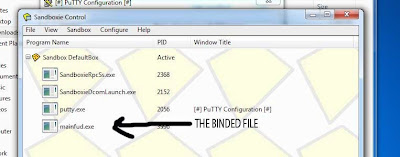
2) Here is where I show you the difference in binded files. Bring up the sandboxie window if its not up already and you should see something similar to the screens below.
Example 1 - A non-binded file.
Example 1 - A non-binded file.

Example 2 - Infected file (Backdoor binded to it)

Note the difference. Its pretty obvious. You WILL NOT see this program running, but you will see the main program running. Dont worry you are still safe! remember, sandboxie is keeping you safe.
This is not the only method for detecting malware but it is one of the easiest. I use sandboxie on EVERYTHING I download. You would be suprised how much bullshit I find!
Also, this method will is great for finding binded files, but if the file is a virus and not binded it may be hard to tell if its actually a virus. Sometimes it will download a file and run it, which will then show up in the list a few seconds later. I advise you to run the steps from PART 3 if you have any suspicion on a download.
This is not the only method for detecting malware but it is one of the easiest. I use sandboxie on EVERYTHING I download. You would be suprised how much bullshit I find!
Also, this method will is great for finding binded files, but if the file is a virus and not binded it may be hard to tell if its actually a virus. Sometimes it will download a file and run it, which will then show up in the list a few seconds later. I advise you to run the steps from PART 3 if you have any suspicion on a download.
PART 3 - Tracing the C&C (Command and Control) Center:
Ok, now that you have detected the binded file, lets trace it to see where it leads. I will give some ideas you can do with what you get out of the tracing at the end of this tutorial.
NOTE: Certain things encrypted for SSL connections may not exactly be tracable.
NOTE 2: If the file is not binded, this is a great way of determining if its malware or a legit program! if its malware, its making a bad connection and you can figure that out by what info this method gives you!
Lets begin with the fun part! I highly recommend that you do this in VMWare. I will explain more on why momentarily.
1) This isn't exactly mandatory but you really should close ALL open programs that access the internet in some way. (Browsers, Dropbox, stuff like that connected to the internet. This is where VMWare comes in handy. If you do this on a clean install on VMWare, theres nothing needed to close and it makes the next steps alot easier.
2) Open Wireshark. Select your working connection in the Interface List. See image below.
1) This isn't exactly mandatory but you really should close ALL open programs that access the internet in some way. (Browsers, Dropbox, stuff like that connected to the internet. This is where VMWare comes in handy. If you do this on a clean install on VMWare, theres nothing needed to close and it makes the next steps alot easier.
2) Open Wireshark. Select your working connection in the Interface List. See image below.

3) Now that you have WireShark open you should be seeing some packets up on the screen... If you give it a quick test and open a browser, you will see the packets as they come in. (probably a shitload of them)
Wireshark Screen:
Wireshark Screen:

4) Now, run your binded program in sandboxie. When the malware runs in sandboxie, it will be trying to connect to its C&C. Your WireShark will be adding packets to its list. We will see the packet its sending and thats how we will trace the malware. It may take a bit to find depending on how many packets are coming in, Where its connecting to etc..
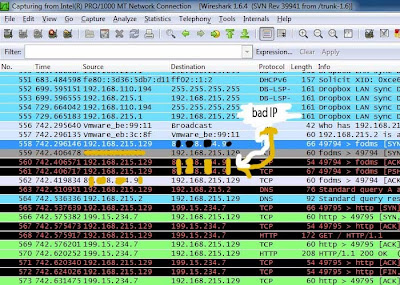
In my example I am using an IRC bot, So thats what we will be looking for! The best way to find what your looking for is by IP. If you dont have anything open you will get a few packets with the same IP's over and over, once you open the malware, the new ip should be fairly easy to spot (again, i say easy if your on vmware with nothing else running)
Here is how It looks when i find the evil IP.
In my example I am using an IRC bot, So thats what we will be looking for! The best way to find what your looking for is by IP. If you dont have anything open you will get a few packets with the same IP's over and over, once you open the malware, the new ip should be fairly easy to spot (again, i say easy if your on vmware with nothing else running)
Here is how It looks when i find the evil IP.

5) Now that we have found the C&C IP, lets go a step further with it! Right click the IP, and select "Follow TCP Stream". It will bring up a screen with some info as shown below. This will give you an idea on what type of malware it is. The information shown will vary depending on the malware, here is how an IRC bot looks.

This also gives other info such as irc server build, how many infects on server etc... As of this point you have successfully traced malware back to its C&C server. CONGRATS!!!
This is just the beginning of what you can do! There are a few things you can do from here.
This is just the beginning of what you can do! There are a few things you can do from here.
1) If an irc server and its not secure, you can easily get on and steal someones bots.
2) DDOS. you have the fuckers ip address, if they are using a RAT or something like that, its most likely off their home connection so you can feel free to knock them offline for as long as you wish 
3) Report the IP or DNS. Especially useful for white hats. IF they are using a no-ip, report their DNS, with proof its almost guaranteed that they will IP ban them. I am actually banned from no-ip for this reason
4) Think about it... Im sure you can find something to do with the information you find.
3) Report the IP or DNS. Especially useful for white hats. IF they are using a no-ip, report their DNS, with proof its almost guaranteed that they will IP ban them. I am actually banned from no-ip for this reason
4) Think about it... Im sure you can find something to do with the information you find.
EDIT: Here is an example of a RAT:
- This is the no-ip connection

- This is what the TCP stream of BlackShades RAT looks like.

I hope this has helped you learn something new.
Thanks for visiting my BLOG!


